

What is Thinking Effort?
Happycapy gives you many models in the model selector. Some models also support Effort, which controls how much reasoning Happycapy should invest in the next task. If a model supports effort control, Happycapy shows the Effort option automatically in the model menu. You do not need to memorize which models support it. Currently, supported models include Sonnet, Opus, GLM, and DeepSeek V4 Pro models, and this list may change as model availability changes. Pick the model for the kind of work, then pick effort for how deeply Happycapy should work on it.Where to Find It
Open the model selector beside the message box. Choose a model. If the model supports effort control, Happycapy shows an Effort row under the model list.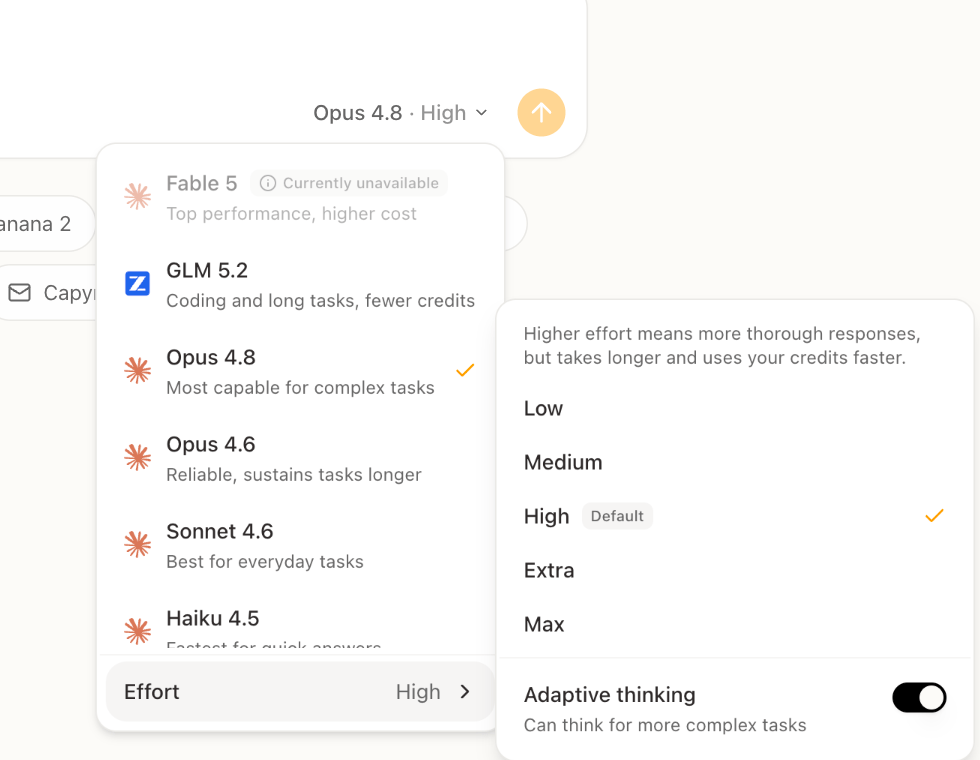
Low, Medium, High, Extra, Max, and Adaptive thinking.
Some models show a default label next to one effort level. Use that as the recommended starting point for that model.
You do not need to mention the effort level in your message. Set it in the model selector, then describe the task normally.
Choose Before a Long Task
For quick questions, changing models or effort is usually fine. For a long or complex task, choose the model and effort before you start. Try not to switch models or effort levels in the middle of the same complex task. Changing them can make Happycapy re-process more context, which may make the next step slower and use credits faster.How to Choose Effort
Start with the default effort when you are unsure. Move up when the task is complex, important, or expensive to redo. Move down when speed and credits matter more than depth.
Use Adaptive Thinking
Adaptive thinking lets Happycapy spend less effort on simple requests and more effort on complex ones. Use it when:- the session mixes quick questions and deeper work
- you are not sure how complex the task will become
- you want Happycapy to decide when deeper reasoning is worth it
What to Know
Higher effort usually gives Happycapy more room to plan, inspect files, use tools, and review results. It also usually takes longer and can use credits faster. Not every model supports effort control. If the model menu does not show Effort, use the model normally or choose another model that offers the setting.Related
- Projects: keep related work and files together
- Files: give Happycapy source material to inspect
- Dynamic Workflows: run larger tasks as staged work
- Credits & Usage: understand credit usage