

동영상 생성이란?
동영상 생성은 텍스트 프롬프트, 이미지, 기존 동영상 클립으로 짧은 동영상을 만드는 기능입니다. 소셜 광고, 제품 데모, 스토리보드, 모션 콘셉트, Project 파일과 함께 보관할 캠페인 에셋에 사용할 수 있습니다. 이미 가지고 있는 자료에서 시작하세요. 입력창 아래의 Generate Video를 클릭해 동영상 모드로 들어간 뒤 만들고 싶은 클립을 설명합니다. 메시지에서 바로 동영상을 만들어 달라고 요청할 수도 있습니다. 특정 모델이 중요하다면 동영상 모델 메뉴에서 선택하거나 프롬프트에 모델을 언급하세요. 그렇지 않다면 원하는 결과를 설명하고 Happycapy가 적절한 경로를 선택하게 두면 됩니다.세 가지 시작 방법
이미 가지고 있는 입력을 선택하세요: 프롬프트, 하나 이상의 이미지, 또는 기존 동영상입니다.1. 텍스트에서 시작하기
원하는 동영상을 설명하세요. 주제, 장면, 움직임, 스타일, 길이, 화면 비율, 사용할 플랫폼을 함께 적으면 좋습니다.2. 이미지에서 시작하기
첫 프레임, 마지막 프레임, 주제, 제품, 캐릭터, 시각 스타일을 더 잘 제어하고 싶을 때 이미지를 업로드하세요.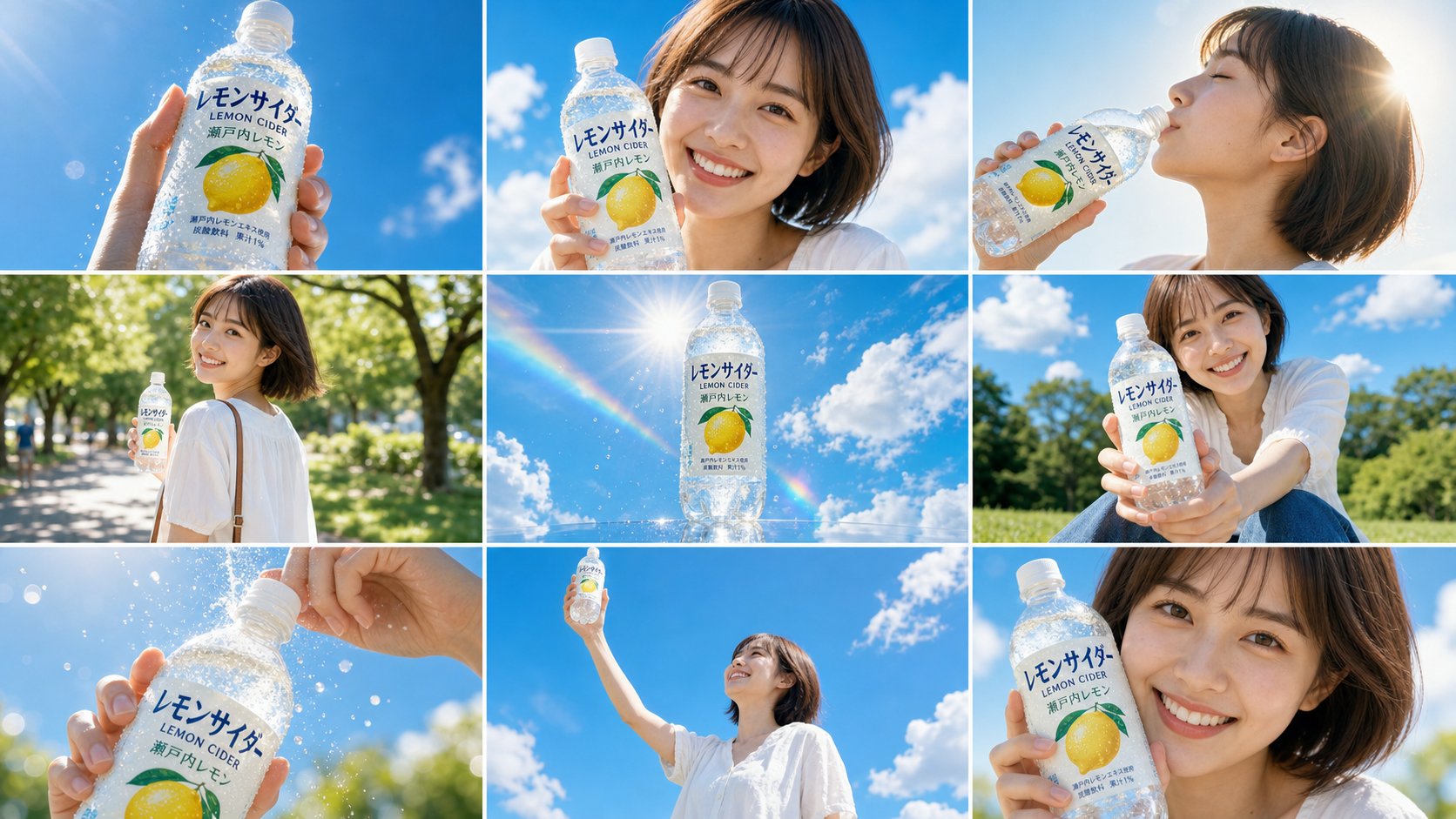
전체 스토리보드 프롬프트
전체 스토리보드 프롬프트
Use the attached 9-panel storyboard image (https://storage.res-capy.com/img-prompt/lemon-cider-ad.png) as the visual reference and shot sequence guide for this advertisement video.

The storyboard shows a cheerful Japanese young woman in a white outfit holding a transparent lemon sparkling water bottle (“レモンサイダー LEMON CIDER 瀬戸内レモン”) against a bright blue summer sky. Reproduce the character’s appearance, product design, color palette, and each shot composition faithfully from the reference.

Follow the 9 panels in order as the scene sequence: bottle thrust toward camera, smiling turn to camera, slow sip, walking glance-back, floating bottle hero shot, bottle offered toward viewer, cap opening close-up, bottle raised to the sky, and final close-up freeze frame.

STYLE: Match the color grading in the reference exactly: overexposed highlights, airy whites, vivid sky blue, warm golden sunlight. Cinematic shallow depth of field. Smooth handheld camera motion with subtle drift. Slow motion on sip, fizz, and final freeze moments.3. 동영상 편집하기
이미 가지고 있는 클립에서 Happycapy가 새 버전을 만들거나, 주체를 바꾸거나, 동작을 조정하거나, 같은 장면을 계속 다듬게 하고 싶을 때 동영상을 업로드하세요.계속 다듬기
동영상이 생성된 후에도 같은 대화에서 계속 작업할 수 있습니다. Happycapy에게 다른 버전 만들기, 움직임 조정, 커버 이미지 생성, 캡션 작성, 최종 파일을 명확한 이름으로 저장하기를 요청하세요.관련 리소스
- 이미지 생성 및 편집: 정지 이미지, 참조 이미지, 커버 에셋을 만듭니다.
- 파일: 생성된 MP4, 커버 이미지, 관련 파일을 찾습니다.
- Credits 및 사용량: 미디어 생성이 credits를 어떻게 사용하는지 이해합니다.
- 짧은 동영상 광고 생성: 전체 동영상 광고 워크플로를 확인합니다.