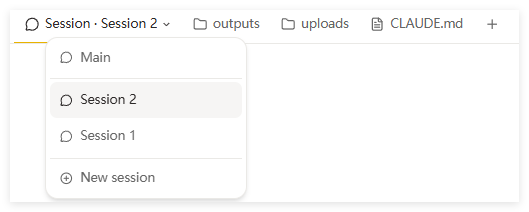
A Desktop is a named project workspace. Each Desktop gets its own directory inside your sandbox at ~/a0/workspace/<desktop-id>/. All sessions you open within that Desktop work in this shared directory — they read and write the same files.This makes Desktops useful for projects that span multiple conversations. Start a task in one session, pick it up in another, and the files are already there.
Inside each Desktop, you can run multiple sessions at the same time. Each session is its own conversation thread, but they all share the same project directory.Practical uses:
One session generates images while another writes the accompanying copy
One session handles frontend code, another handles the backend
One session researches a topic, another drafts the report
All output lands in the same ~/a0/workspace/<desktop-id>/ folder.To open a new session: click the + button next to the session name at the top of the Desktop.To switch between sessions: click the session name dropdown at the top.
Click the ☆ icon in a session’s header to pin it to the Favorites section at the top of the sidebar. Useful for sessions you return to often. Click again to remove.
Click New Desktop in the sidebar. Give it a name that reflects the project. Happycapy creates a fresh workspace directory for it.
One Desktop per project is a clean setup. Use multiple sessions within it when you want to run tasks in parallel — they all share the same output folder, so results stay together.