> ## Documentation Index
> Fetch the complete documentation index at: https://docs.happycapy.ai/llms.txt
> Use this file to discover all available pages before exploring further.
# 自定义密钥
> 保存私密访问密钥,让 Happycapy 使用外部工具时不需要把密钥暴露在对话里。
自定义密钥是用于 Happycapy 之外服务的私密访问密钥,例如 GitHub、Notion、Fly.io、Stripe 或你自己的内部工具。
当某个工具需要 token 或 API key 时,请在 **Settings > Sandbox > Custom secrets** 中添加,而不是把密钥粘贴到对话里。Happycapy 会在每次消息启动时,把密钥作为环境变量注入沙箱。
## 什么时候使用自定义密钥
当 Happycapy 需要代表你访问某个服务或工具时,就适合使用自定义密钥。
常见例子包括:
* 检查 GitHub 仓库、Pull Request 或 workflow 运行记录
* 创建或更新 Notion 页面
* 在 Fly.io 等平台部署或检查应用
* 运行会调用你自己的 Stripe、分析、数据库或内部 API 的脚本
* 使用需要从环境变量读取凭据的命令行工具
## 添加密钥
1. 打开 **Settings**。
2. 进入 **Sandbox**。
3. 找到 **Custom secrets**。
4. 点击 **Add**。
5. 填写 **Key**、**Value** 和 **Description**。
6. 点击 **Create**。
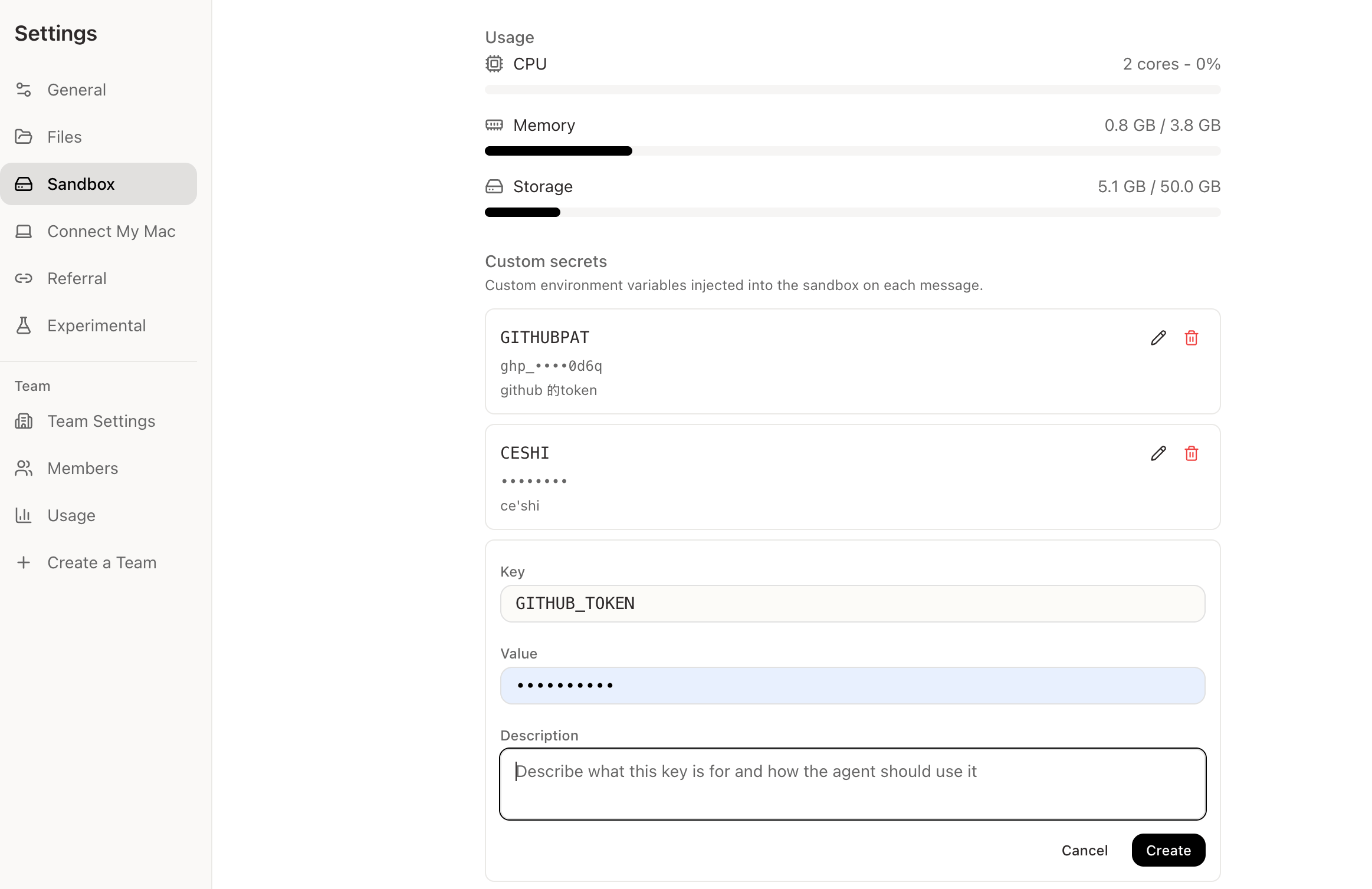 ## 每个字段是什么意思
| 字段 | 简单解释 | 示例 |
| --------------- | ---------------------------- | --------------------------------------------------- |
| **Key** | Happycapy 和工具用来找到这个密钥的名称。 | `GITHUB_TOKEN` |
| **Value** | 真正的私密 token、API key 或密钥值。 | 粘贴来自 GitHub、Notion 或其他服务的值。 |
| **Description** | 简短说明,让 Happycapy 知道这个密钥用于什么。 | `GitHub access for checking PRs and workflow runs.` |
Description 最好写成简短指令,而不只是标签。
好的写法:
```text theme={null}
GitHub token for using the gh CLI and GitHub API in my repositories.
```
太模糊:
```text theme={null}
github token
```
## 常见示例
| Key | 用途 |
| -------------------- | -------------------------------------------- |
| `GITHUB_TOKEN` | 读取仓库、检查 Pull Request、使用 GitHub API,或运行 `gh`。 |
| `NOTION_TOKEN` | 通过 Notion API 处理 Notion 页面或数据库。 |
| `FLY_API_TOKEN` | 使用 `flyctl` 部署或检查 Fly.io 应用。 |
| `STRIPE_API_KEY` | 测试会调用你自己 Stripe 账号的脚本。 |
| `INTERNAL_API_TOKEN` | 从脚本调用你的公司或项目 API。 |
这些名称只是示例。请始终使用对应工具、SDK 或 CLI 期望的 key 名称。
## Happycapy 如何使用密钥
添加自定义密钥后,你不需要把具体值粘贴到对话里。正常描述任务即可。
```text theme={null}
Use GitHub to check the latest failed workflow run and summarize what broke.
```
```text theme={null}
Use the Notion API to create a task list from this meeting summary.
```
Happycapy 可以知道这个环境变量存在,并根据 Description 理解它的用途。密钥值会在界面中保持隐藏。
## 提示
不要把私密 token 直接粘贴到对话里。
尽量使用清晰、标准的 key 名称。很多工具会查找固定的环境变量名称。
Description 要写具体。说明服务、工具和预期用途。
删除不再需要的密钥。
如果某个工具找不到密钥,检查 key 名称是否和工具期望的一致。
## 相关资源
* [CLI 工具](/zh/integrations/cli):使用会从环境变量读取凭据的命令行工具。
* [MCP](/zh/integrations/mcp):通过 MCP 服务器把 Happycapy 连接到外部工具和系统。
* [Files](/zh/features/files):管理沙箱中的上传文件和生成输出。
## 每个字段是什么意思
| 字段 | 简单解释 | 示例 |
| --------------- | ---------------------------- | --------------------------------------------------- |
| **Key** | Happycapy 和工具用来找到这个密钥的名称。 | `GITHUB_TOKEN` |
| **Value** | 真正的私密 token、API key 或密钥值。 | 粘贴来自 GitHub、Notion 或其他服务的值。 |
| **Description** | 简短说明,让 Happycapy 知道这个密钥用于什么。 | `GitHub access for checking PRs and workflow runs.` |
Description 最好写成简短指令,而不只是标签。
好的写法:
```text theme={null}
GitHub token for using the gh CLI and GitHub API in my repositories.
```
太模糊:
```text theme={null}
github token
```
## 常见示例
| Key | 用途 |
| -------------------- | -------------------------------------------- |
| `GITHUB_TOKEN` | 读取仓库、检查 Pull Request、使用 GitHub API,或运行 `gh`。 |
| `NOTION_TOKEN` | 通过 Notion API 处理 Notion 页面或数据库。 |
| `FLY_API_TOKEN` | 使用 `flyctl` 部署或检查 Fly.io 应用。 |
| `STRIPE_API_KEY` | 测试会调用你自己 Stripe 账号的脚本。 |
| `INTERNAL_API_TOKEN` | 从脚本调用你的公司或项目 API。 |
这些名称只是示例。请始终使用对应工具、SDK 或 CLI 期望的 key 名称。
## Happycapy 如何使用密钥
添加自定义密钥后,你不需要把具体值粘贴到对话里。正常描述任务即可。
```text theme={null}
Use GitHub to check the latest failed workflow run and summarize what broke.
```
```text theme={null}
Use the Notion API to create a task list from this meeting summary.
```
Happycapy 可以知道这个环境变量存在,并根据 Description 理解它的用途。密钥值会在界面中保持隐藏。
## 提示
不要把私密 token 直接粘贴到对话里。
尽量使用清晰、标准的 key 名称。很多工具会查找固定的环境变量名称。
Description 要写具体。说明服务、工具和预期用途。
删除不再需要的密钥。
如果某个工具找不到密钥,检查 key 名称是否和工具期望的一致。
## 相关资源
* [CLI 工具](/zh/integrations/cli):使用会从环境变量读取凭据的命令行工具。
* [MCP](/zh/integrations/mcp):通过 MCP 服务器把 Happycapy 连接到外部工具和系统。
* [Files](/zh/features/files):管理沙箱中的上传文件和生成输出。